

Usage steps
-
Review the existing member list and use Search by name or email to avoid a duplicate invitation.
-
Select Invite Member. Enter Email Address and choose the Role offered by your account.
-
Add a Personal Message if useful. Check the recipient and role before selecting Send Invitation.
-
The recipient follows the email invitation to join. Return to Team to confirm membership or review a pending invitation if shown.
-
Use Edit on an eligible member row to review available role or access changes. Confirm the intended permissions before saving.
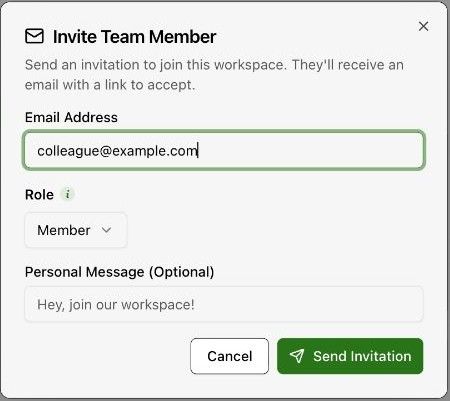
Expected result. The teammate receives the invitation and can join with the assigned access.
Practical notes and troubleshooting. Owner, Admin, Member and Viewer are visible role categories. The exact permission matrix should be confirmed with your organisation administrator.