

Usage steps
-
Check the workspace selector at the top left. Open it when you need to switch to another available workspace.
-
Use Home for the workspace assistant. Use Agents, Knowledge Base and Resources to prepare your agent.
-
Use Agent Testing to simulate conversations. Use Telephony to connect numbers and Campaigns to manage outbound calling.
-
Use Dashboard for overall results and Calls to investigate individual conversations. WhatsApp and Automations have their own sidebar entries.
-
Open Configuration for team, billing, integrations and other workspace settings. The notification bell and account menu are separate from the feature navigation.
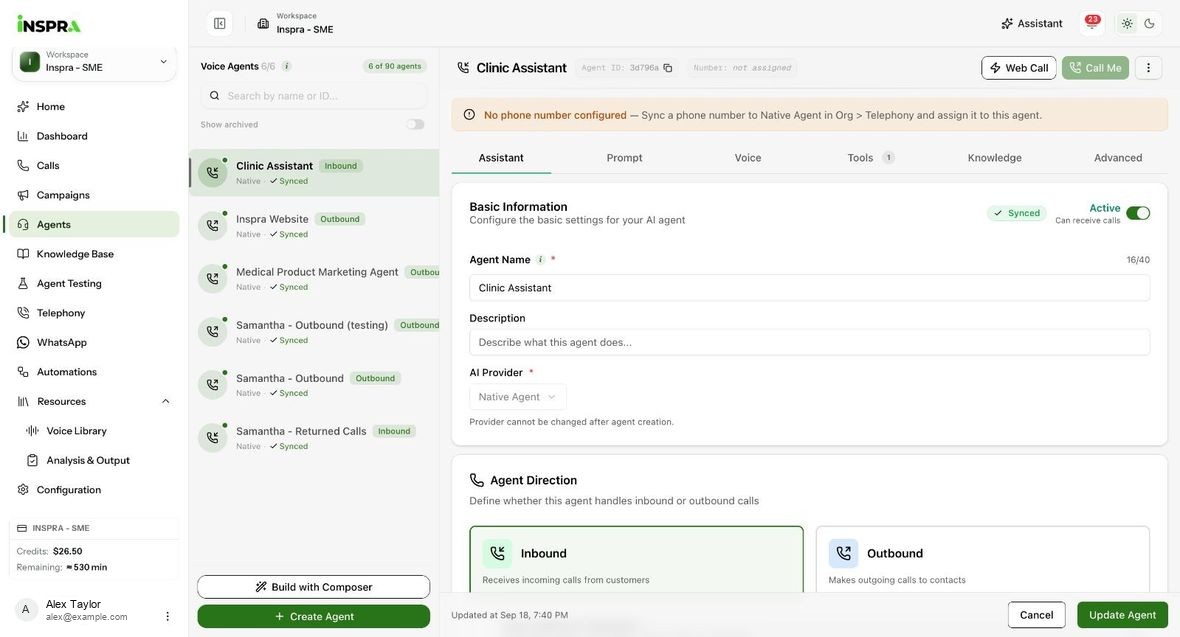
Expected result. You can locate the feature you need and confirm the workspace it belongs to.
Practical notes and troubleshooting. Available controls depend on your role, connected provider and organisation settings. A disabled control may be managed at organisation level.