

Usage steps
-
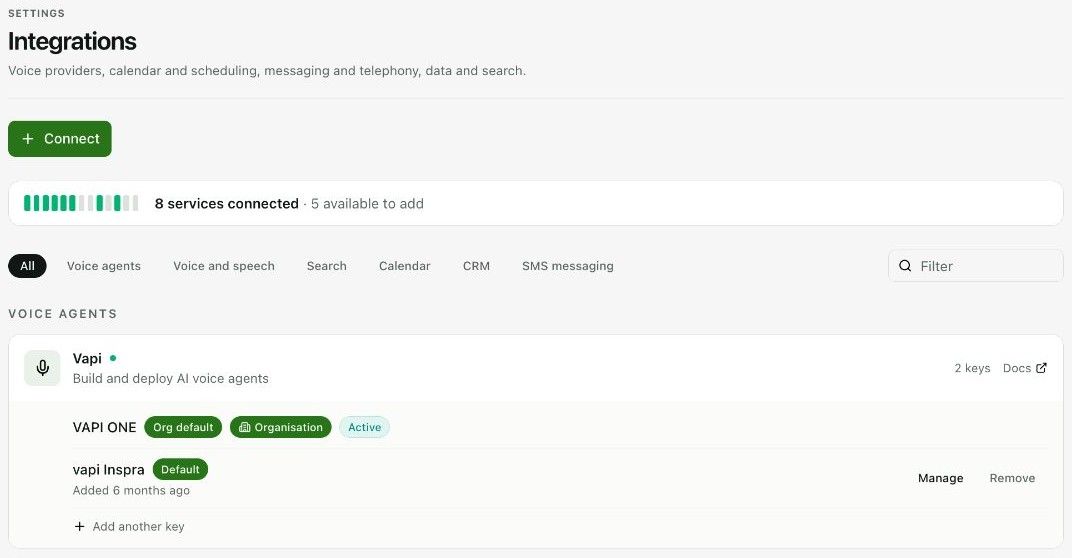
Use All or a category filter such as Voice agents, Voice and speech, Calendar, CRM or SMS messaging.
-
Review the status and key labels on the service card. Organisation defaults and workspace defaults are identified separately.
-
Use Connect for a new service or Add another key for an additional connection. Enter a descriptive integration name and the required credentials in the form.
-
Review Set as Default if offered. Complete the connection and confirm the expected service or key appears as active.
-
Return to the agent or workflow and choose the intended integration where a selector is available. Test the specific operation that depends on it.
Expected result. The workspace can use the intended external service.
Practical notes and troubleshooting. Do not remove a shared connection without checking which agents and flows depend on it.