

Usage steps
-
Open Automations and create a New flow or select an existing flow. Review its draft or active state and validation indicator.
-
Choose the trigger appropriate to the workflow, such as Call Ended, Inbound Message, Campaign Contact, Schedule or Webhook.
-
Add the required steps from the palette and connect them in the intended sequence. Select a block to configure its fields.
-
Use Filter, Time Filter, Branch, Loop or Wait where the flow needs conditions, routing or timing. Set Variable and API Request support data handling.
-
Resolve validation issues, save the version and use Test run with controlled inputs. Inspect Executions to understand what ran.
-
Activate only when the tested flow is ready to respond to live events.
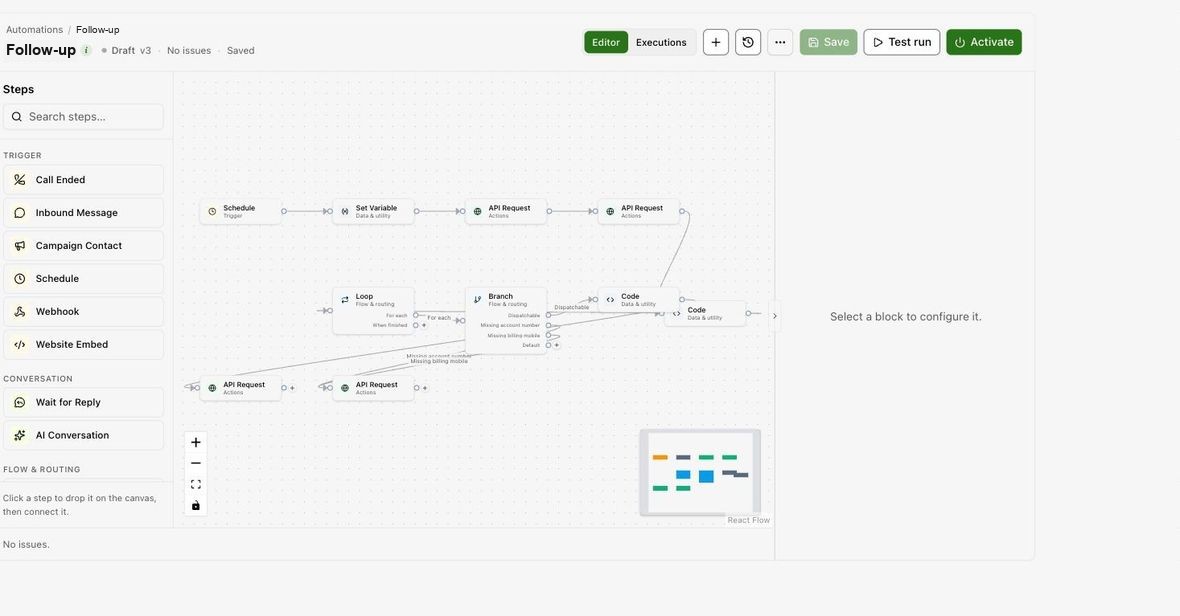
Expected result. You have a configured, tested flow ready for activation.
Practical notes and troubleshooting. Test runs can execute configured actions. Use test destinations for steps that send messages, place calls or change external records. To message a whole list instead, use an SMS campaign (see SMS).