

Usage steps
-
Open Agent Testing and select New test.
-
In Agent, choose the agent to evaluate and select Continue.
-
In Persona, choose a template, a saved persona or Create custom persona. Templates include a busy professional, a skeptical buyer and a first-time caller.
-
Use the optional Tweak field to add a specific situation, such as a caller who needs an appointment before Friday.
-
Select Continue to choose the scorecard. Keep the persona goal aligned with the behaviour you want to measure.
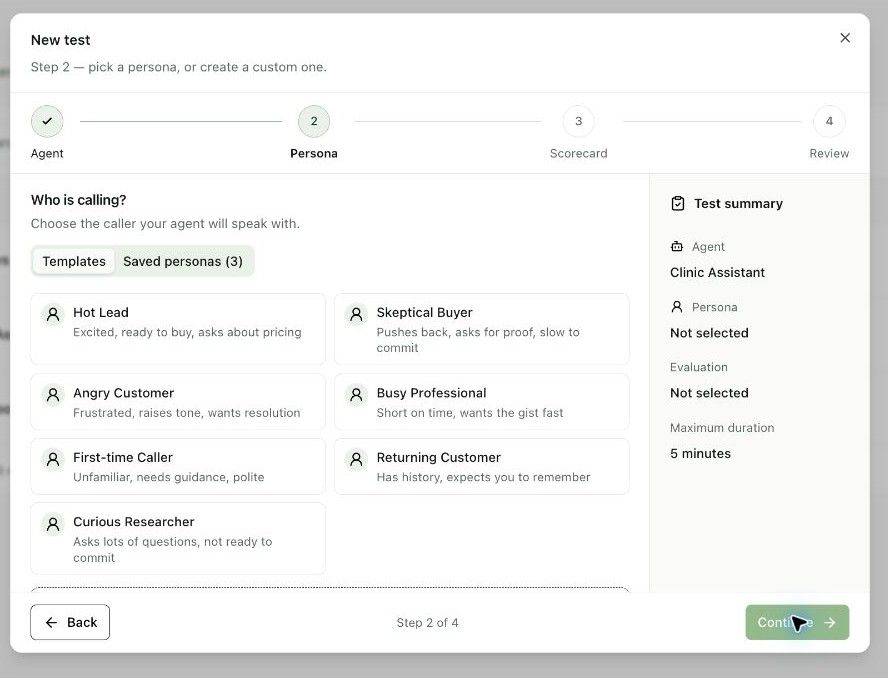
Expected result. The test has an agent and a defined simulated caller.
Practical notes and troubleshooting. Start with one clear behaviour per scenario. Use different personas to test different conversation pressures.
Related next steps
Choose a scorecard and run the testA scorecard defines what a successful conversation looks like. Choose relevant checks so the result measures your actual goal.Configure call analysis and scorecardsCall analysis classifies conversations into outcomes. Structured outputs extract data, while scorecards evaluate quality. Configure each for a distinct purpose.