

Usage steps
-
Open Knowledge Base and select Add Document.
-
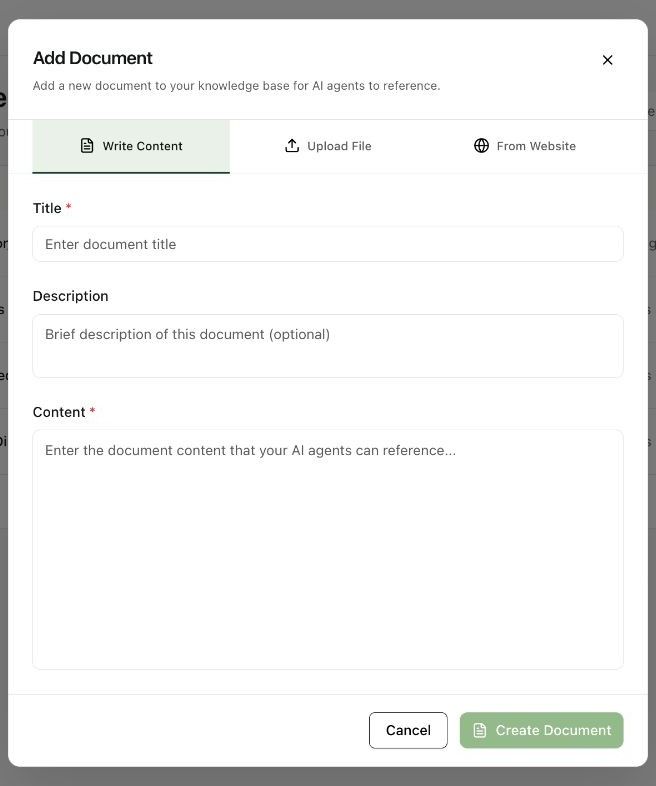
Choose Write Content. Enter a clear Title and an optional Description that explains what the document covers.
-
Enter the Content. Organise it into direct questions and answers or short sections with specific facts.
-
Select Create Document when the required fields are complete. Confirm that the document appears in the list.
-
Open the target agent, go to Knowledge, enable the knowledge section if needed, select the document and save with Update Agent.
Expected result. The document is stored and attached to the agent that needs it.
Practical notes and troubleshooting. Keep unrelated topics in separate documents so each agent can be given only the knowledge it needs.
Related next steps
Attach knowledge and add instant answersThe Knowledge tab connects workspace documents to a particular agent. Instant Answers provide approved responses that the agent can speak word for word for frequently asked questions.Upload a knowledge fileUpload File converts an existing document into reference material. This is useful for product guides, policies and structured FAQs already maintained by your team.