

Usage steps
-
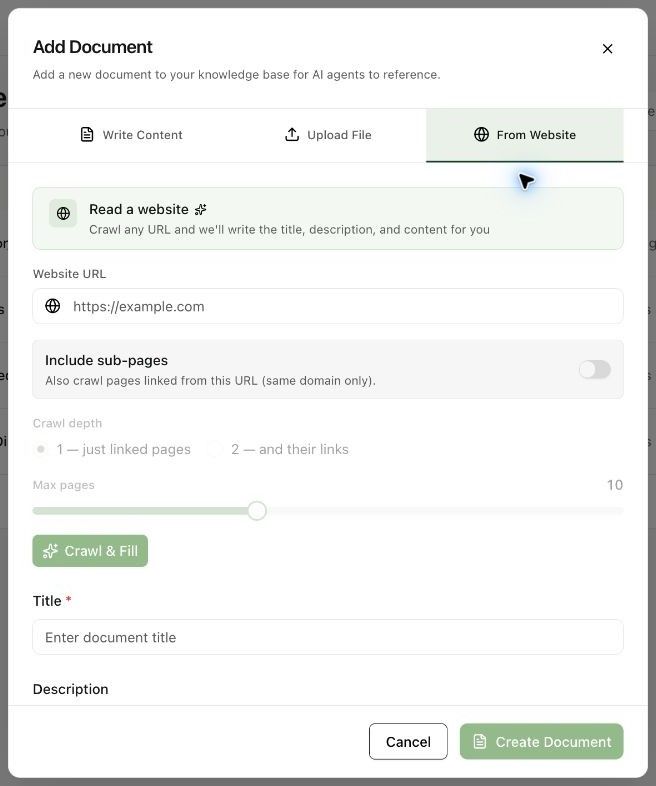
Choose From Website and enter the Website URL.
-
Enable Include sub-pages only if linked pages are relevant. Review Crawl depth and Max pages; sub-pages are limited to the same domain.
-
Select Crawl & Fill to retrieve the content.
-
Review the generated Title, Description and Content. Remove navigation text, outdated claims or unrelated material before saving.
-
Select Create Document, attach it to the agent and test questions against the imported facts.
Expected result. You have a reviewed knowledge document based on the selected website content.
Practical notes and troubleshooting. Treat the imported text as a snapshot. Revisit it when the source information changes.
Related next steps
Attach knowledge and add instant answersThe Knowledge tab connects workspace documents to a particular agent. Instant Answers provide approved responses that the agent can speak word for word for frequently asked questions.Create a knowledge documentKnowledge Base stores reference material agents can use to answer questions. Creating a document in the workspace and attaching it to an agent are separate steps.