

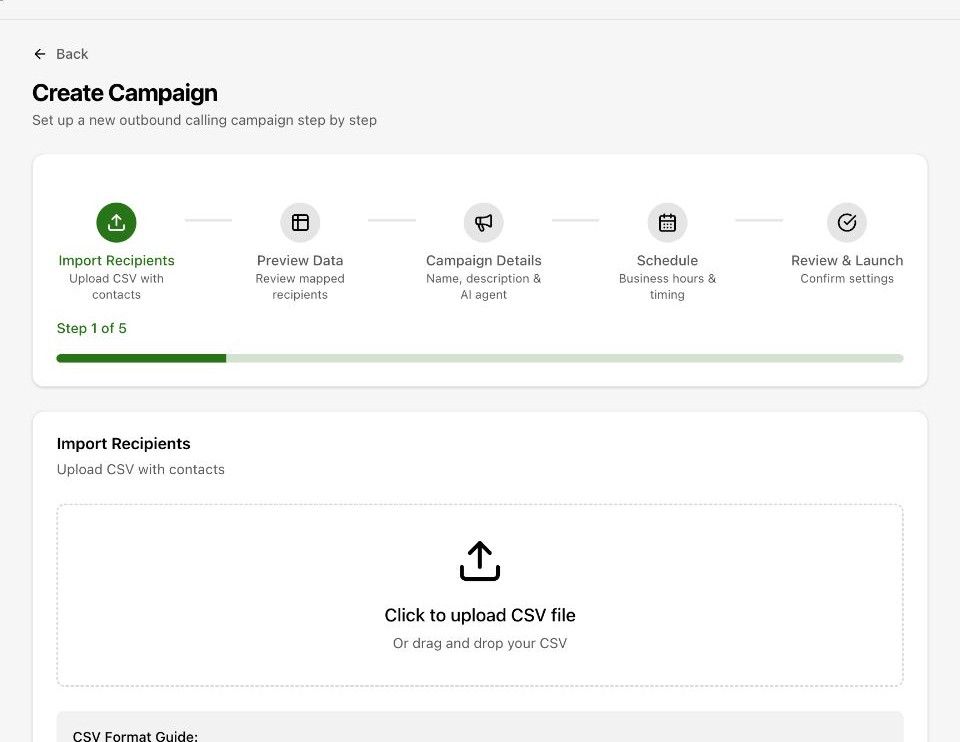
Import Recipients
Upload a CSV.
customer_phoneis required;first_name,last_name,emailandcompanyare standard. Any other column becomes a custom variable you can use as{{column_name}}. Download the template CSV from this step. You can skip it and add recipients later.Preview Data
Check how columns were mapped and fix anything in the wrong field. The data quality report flags missing and invalid values.
Campaign Details
Name, description and the outbound agent that makes the calls.
Schedule
Start immediately or at a date and time, the timezone, business hours per day, and holidays: load public holidays for a country or add your own, one-off or yearly.
Review & Launch
Confirm and launch. The campaign appears on the Campaigns page with live progress.
A campaign never dials outside its business hours or on its holidays. A large list at low concurrency simply takes longer.
Campaigns can be created over the API too: Create campaign.