

In the dashboard the button is Inspra Copilot, and the conversation opens as Build an agent in Home. Every instruction on this page uses the on-screen labels.
What it is
Inspra Copilot is a build-time assistant for you and your team. You describe the agent you want in plain language; it asks guided questions, collects the essentials, and prepares a configuration for you to review. The screen states that it will ask before creating or deploying the agent, so nothing is created until you confirm.
It is not the agent your customers talk to. Keep the two apart:
| Inspra Copilot | Your voice agent | |
|---|---|---|
| Who talks to it | You and your team, while building | Callers, on live calls and tests |
| Where | Home, in the Build an agent conversation | Phone calls, campaigns and Web Call tests |
| What it produces | A proposed agent configuration for your review | Conversations, call records, transcripts and analysis |
| What it follows | Your brief and your answers | The saved prompt, first message, knowledge and tools |
When to use it instead of the form
| Use Inspra Copilot when | Use the form (Create an agent with the form) when |
|---|---|
| You can describe the job but are unsure how to express it as a prompt and settings. | You already know the exact name, direction, model, voice and tools. |
| You are building a first agent and want guided questions. | You must choose a specific provider (Native Agent, Vapi or Retell) or a specific integration key. |
| You want a draft to refine through conversation. | You are changing one field on an existing agent; use its tabs instead. |
Inspra Copilot builds agents on Native Agent. For a Vapi or Retell agent, use the form (Create an agent with the form).
What to prepare
- Purpose: the one job the agent should do first, and what it must not do.
- Direction and callers: inbound or outbound, and who the callers are.
- Greeting: an approved opening message.
- Hours: business hours, timezone and what should happen outside them.
- Approved knowledge: the documents the agent may use. Create or upload them first (Create a knowledge document, Upload a knowledge file or Import knowledge from a website).
- Voice and language: the language callers use and the kind of voice you want.
- Escalation: when to hand over to a person, and to whom.
- Actions and integrations: for example checking availability or booking, and the calendar or service each action depends on (Connect services to the workspace, Connect calendars for appointment workflows).
Usage steps
-
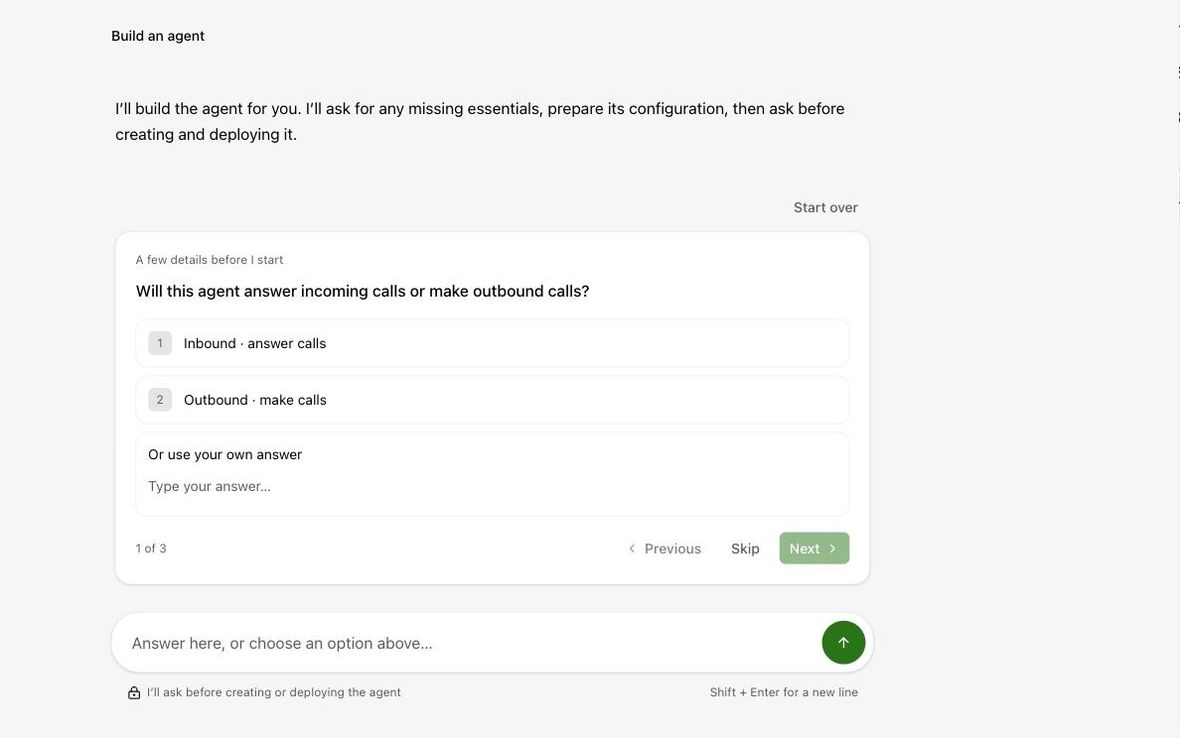
Open Agents and select Inspra Copilot. The platform opens a Build an agent conversation in Home. Its opening message says it will ask for missing essentials, prepare the configuration, and ask before creating and deploying the agent.
-
Answer the first question card, headed A few details before I start. It usually asks first whether the agent will answer incoming calls or make outbound calls. Choose Inbound · answer calls or Outbound · make calls, or type in Or use your own answer, then select Next.
-
Continue through the follow-up questions. Use Previous to revisit an answer and give specific details about the goal, audience and boundaries. Only use Skip if you intend to supply that detail later, and look for it during review. Start over begins the session again.
-
Add your brief in the message box (Answer here, or choose an option above…). Describe the required knowledge and actions, such as checking availability or transferring to a person, and the situations the agent must escalate. Use the send control to submit.
-
Ask follow-up requests until the proposal matches your intent. See follow-up requests to try.
-
Review the proposed configuration before confirming creation or deployment. Use the checklist below, and do not confirm while any item is wrong or missing.
-
After the agent is created, open it and inspect its tabs: identity and direction, prompt, voice, tools and knowledge. Correct anything the proposal missed, save with Update Agent, and then test the conversation with Web Call (Test with a browser call).
Example brief: clinic receptionist
The brief below is an original, illustrative example for a fictional clinic. It asks Inspra Copilot to configure capabilities; it is not a claim that each capability will be set up automatically.
Please help me configure an inbound receptionist agent for Harbourside Family Clinic.
Purpose: answer patient calls, give opening hours and general clinic information, and help callers request an appointment. It must not give medical advice.
Greeting: “Thank you for calling Harbourside Family Clinic. How can I help you today?”
Business hours: Monday to Friday 8 am to 6 pm, Saturday 9 am to 12 pm, closed Sundays and public holidays, Australia/Sydney time. Outside these hours, take the caller’s name and number for a callback.
Approved knowledge: use only the “Clinic FAQ” document in the Knowledge Base for services, fees and parking.
Voice and language: a warm, calm voice speaking English (Australia) at a moderate pace.
Escalation: transfer to reception staff when the caller asks for a person, asks for clinical advice, is distressed, or describes urgent symptoms. If the caller describes an emergency, tell them to hang up and call 000.
Booking: I would like the agent to check availability and book appointments in our clinic calendar. Tell me which calendar integration this requires and whether it is connected in this workspace.
What the example depends on: booking needs a connected calendar (Connect calendars for appointment workflows) and availability and booking tools offered by the agent’s provider (Add built-in tools to an agent). A transfer needs a destination configured in the transfer tool. The Clinic FAQ must already exist and be attached to the agent (Attach knowledge and add instant answers). Hours described in a brief may become prompt instructions rather than a setting, so check the result.
Follow-up requests to try
These are examples of requests you can type after the first proposal. They are not verified transcripts, and the responses depend on your session.
- Shorter greeting: “Make the greeting shorter, under ten words, and keep the clinic name.”
- Clearer scope: “Clarify the scope: do not give medical advice, discuss test results, or quote fees that are not in the Clinic FAQ.”
- Escalation instructions: “Add escalation instructions: transfer to reception if the caller asks for a person or sounds distressed, and tell callers describing an emergency to hang up and call 000.”
- See the draft: “Show me the first message and prompt you have prepared before anything is created.”
- Tool check: “Which tools have you included, and what does each one need before it will work?”
- Out of hours: “Outside business hours, take a name and number for a callback instead of booking.”
What to check before you confirm
- Direction and provider: inbound or outbound as intended; the provider (Native Agent, Vapi or Retell) is the one you want, since it cannot be changed after creation.
- First message: matches the approved greeting.
- Prompt: states the purpose, what the agent must not do, how to handle missing information, and the escalation conditions.
- Knowledge: only approved documents, and attached to the agent rather than just named in the prompt.
- Tools: each requested action is attached and configured. Writing a tool name in the prompt does not by itself attach or configure that tool.
- Integrations: the calendar or other service that each tool depends on is connected.
- Voice and language: the intended voice and primary language.
- Deployment: nothing is assigned to a number or campaign that you did not intend. Confirm deployment only after a successful test.
- Gaps: anything the assistant says it could not configure.
If a requested capability is unavailable
- Ask the assistant which parts of the brief it could not configure, and note them.
- Check the prerequisite: a connected integration (Connect services to the workspace), an existing knowledge document (Create a knowledge document), a tool the provider offers (Add built-in tools to an agent), or an available number (Add a number and receive inbound calls).
- Configure the missing part yourself in the agent tabs after creation, then save with Update Agent.
- If the capability is not available at all, change the prompt so the agent does not promise it. For example, take callback details instead of booking.
- If you expected the capability to be available, raise it with your workspace administrator or support (Configure notifications and support ownership).
Expected result. You have a reviewed configuration that can be created as an agent.
Practical notes and troubleshooting. The questions can vary with your answers. Review the generated instructions and tool choices before using them. Inspra Copilot prepares a configuration; it does not guarantee that generated tools work, and it may not be able to perform every platform action. Always test with Web Call before deployment.