

Usage steps
-
Open Call rules and read the tenant-scope notice.
-
To add a block, enter the phone number, choose the block type shown in the selector and enter the required Reason. Add a DID tag only if needed.
-
Review the entry and select Add. Confirm it appears in the blocked-number table.
-
Review Answering machine detection to understand how outbound voicemail detection is configured. Controls may be managed by your organisation.
-
Use the read-only SIP headers section when coordinating integration troubleshooting with your telephony administrator.
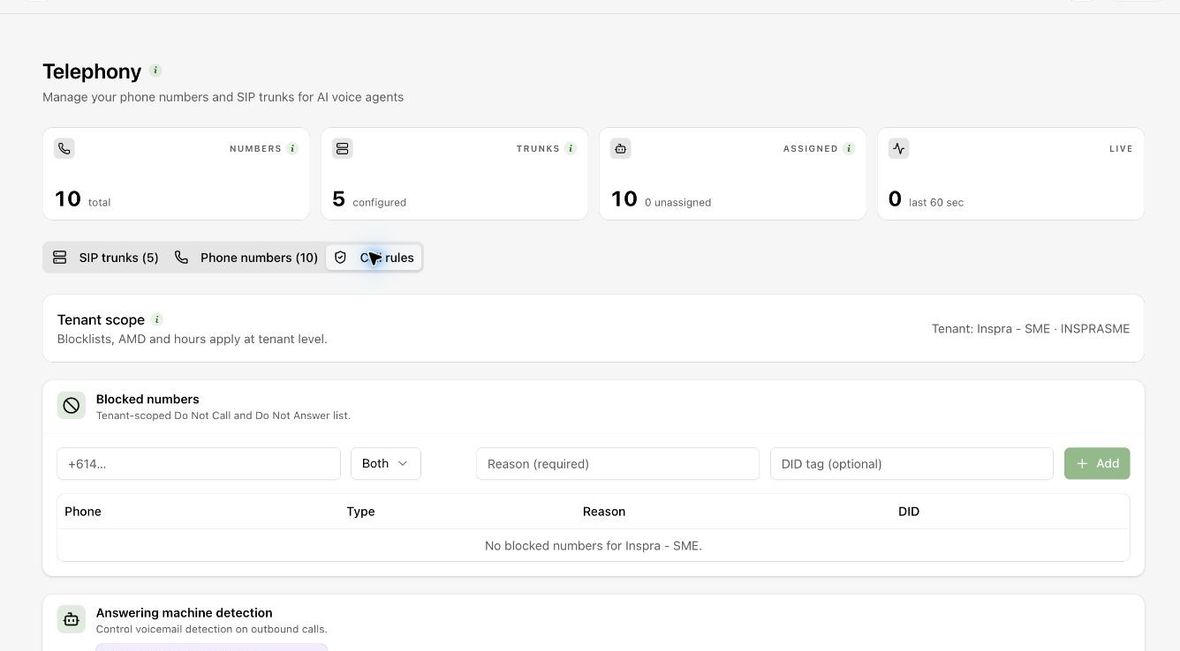
Expected result. You can identify the applicable calling rules and maintain authorised block entries.
Practical notes and troubleshooting. A Do Not Call analysis outcome and a number in the telephony blocklist are different records. Verify the applicable suppression workflow rather than assuming one automatically updates the other.