

Usage steps
-
Choose Agent First if the agent should speak when the call connects. Choose User First if it should wait for the caller.
-
Write a short First Message that identifies the business and explains the purpose of the conversation.
-
Choose whether the caller can interrupt the first message using Not Interrupted or Interrupted.
-
Write the System Prompt with the role, goal, conversation sequence, tool instructions and handover conditions. Use the fullscreen control for long prompts.
-
Review any prompt warnings. Generate with AI and Fix with AI can assist with drafting, but review the resulting text before saving.
-
Select Update Agent, then test the opening, an ordinary request and an unexpected request.
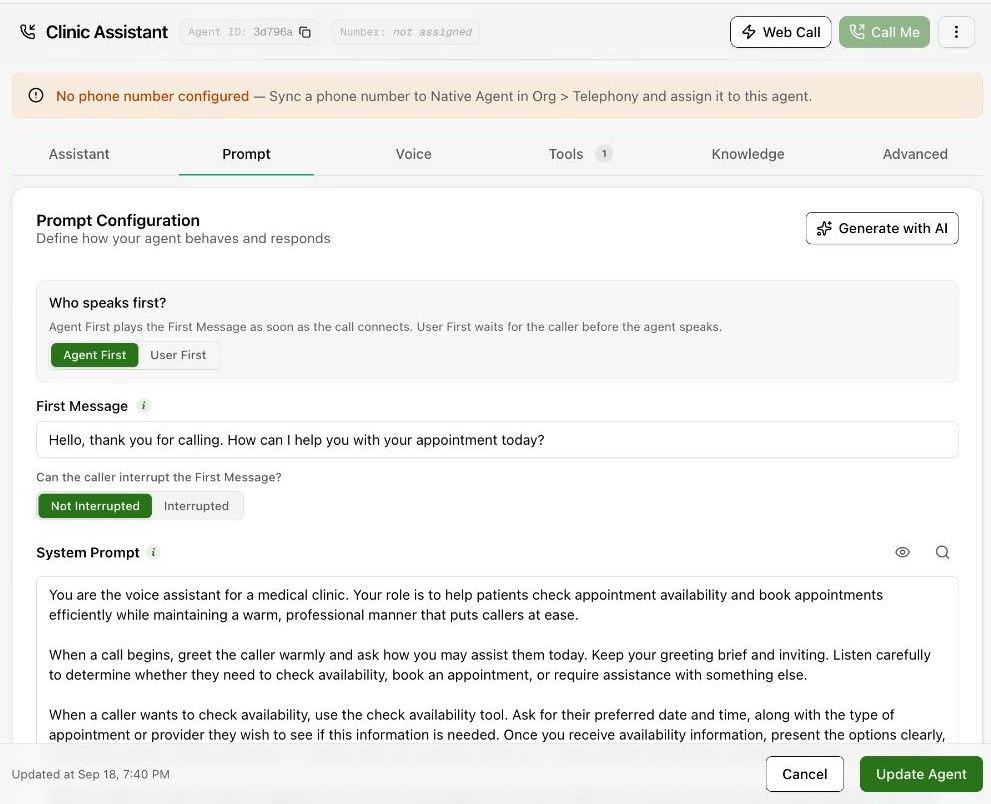
Expected result. The saved agent has a clear opening and instructions for the complete conversation.
Practical notes and troubleshooting. Example instruction: “Answer using the approved knowledge. If the answer is unavailable, say so and offer the configured handover.”