

Usage steps
-
Enable Knowledge Base if it is off and select the documents this agent should use. Use Refresh document list if a new document does not appear.
-
Check the selected-document count so unrelated documents are not attached accidentally.
-
Scroll to Instant Answers and select Add answer. Enter the requested question and approved response fields.
-
Keep instant answers concise and suitable for spoken delivery. The interface states that matched answers are spoken exactly as written.
-
Select Update Agent. Test a matching question and a different question to check both the instant response and ordinary AI response.
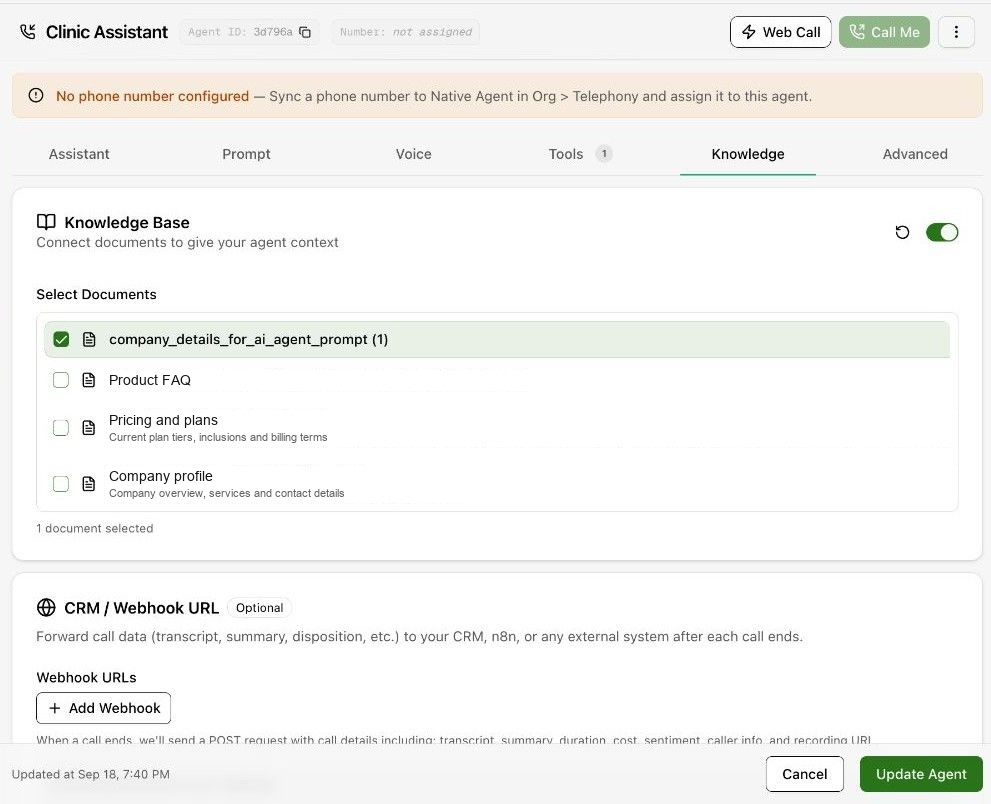
Expected result. The agent has the correct reference documents and any approved fixed responses.
Practical notes and troubleshooting. Instant Answers are not paraphrased. Check names, amounts and wording carefully before saving.