

Usage steps
-
Find the agent using Search by name or ID. Select its card to open the editor.
-
Review the active status and provider sync indicator. Edit Agent Name and Description as needed.
-
Review Inbound or Outbound direction. For an inbound agent that also needs campaigns, review Allow Outbound Campaigns.
-
For inbound calling, choose a number in Phone Number (Receives Calls). Only numbers available for the agent provider are shown.
-
Select Update Agent to save. Confirm the saved state and test the changed behaviour.
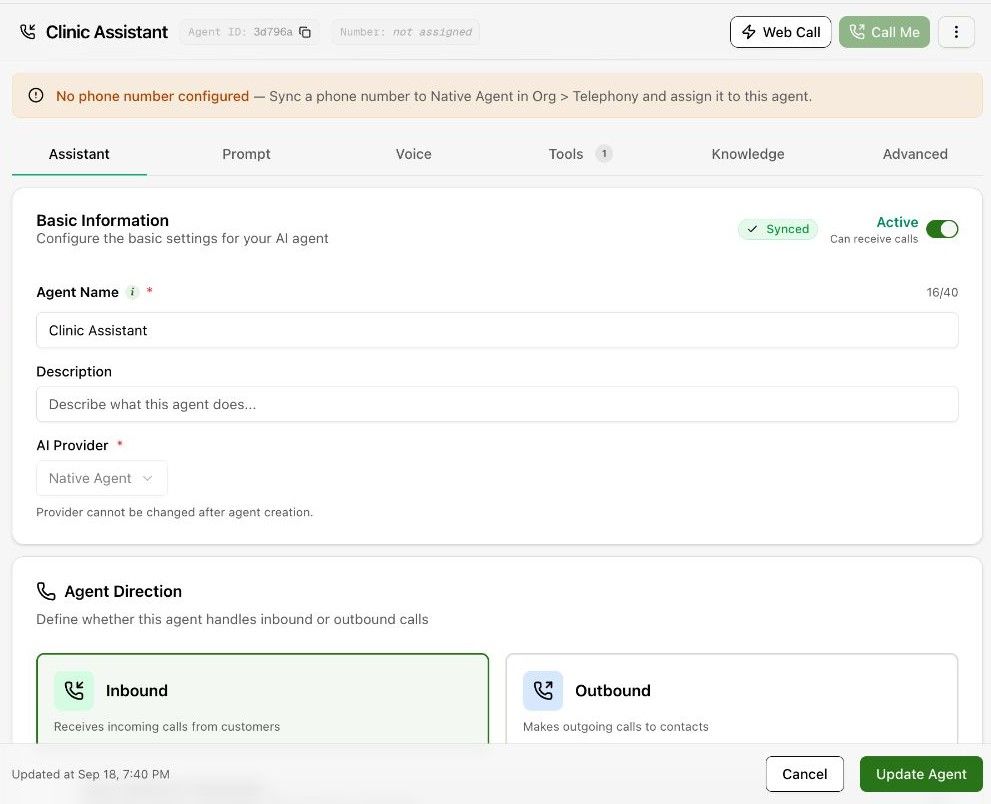
Expected result. The agent has the intended identity and routing configuration.
Practical notes and troubleshooting. If Call Me is disabled with a missing-number message, complete telephony sync and number assignment first.
Related next steps
Add a number and receive inbound callsA phone number defines where inbound calls go and whether the number can be used for outbound caller identity. It must be associated with the correct trunk and agent.Test with a browser callWeb Call lets you speak to an agent from your browser. Use it to hear the opening message, test responses and check the behaviour of configured tools.