

Two separate billing relationships
| Area | What it covers |
|---|---|
| Billing > Current Plan | Your organization's white-label subscription, status, and workspace allowance. |
| Billing > Stripe Connect | Your agency's connected payment account for client billing. |
| Subscription Plans | The plans offered to your client workspaces. |
Use the amounts and allowances displayed for your assigned plan. There is no single fixed agency price or workspace count for every organization.
Activate your organization subscription
Open Billing and review Current Plan. If an assigned plan is awaiting activation, select Complete Checkout. Active subscriptions expose subscription management controls.
Connect payments for client plans
Connect with Stripe
In Billing > Stripe Connect, select Connect with Stripe and complete the hosted onboarding.
Check the returned status
Review whether charges, payouts, and onboarding are enabled or complete. Use Complete Onboarding if required.
Create a paid client plan
Open Subscription Plans after connection. Agency paid plans require Stripe Connect.
Create a client subscription plan
Select Create Plan, enter its name and description, and configure the applicable settings. Review the total before saving.
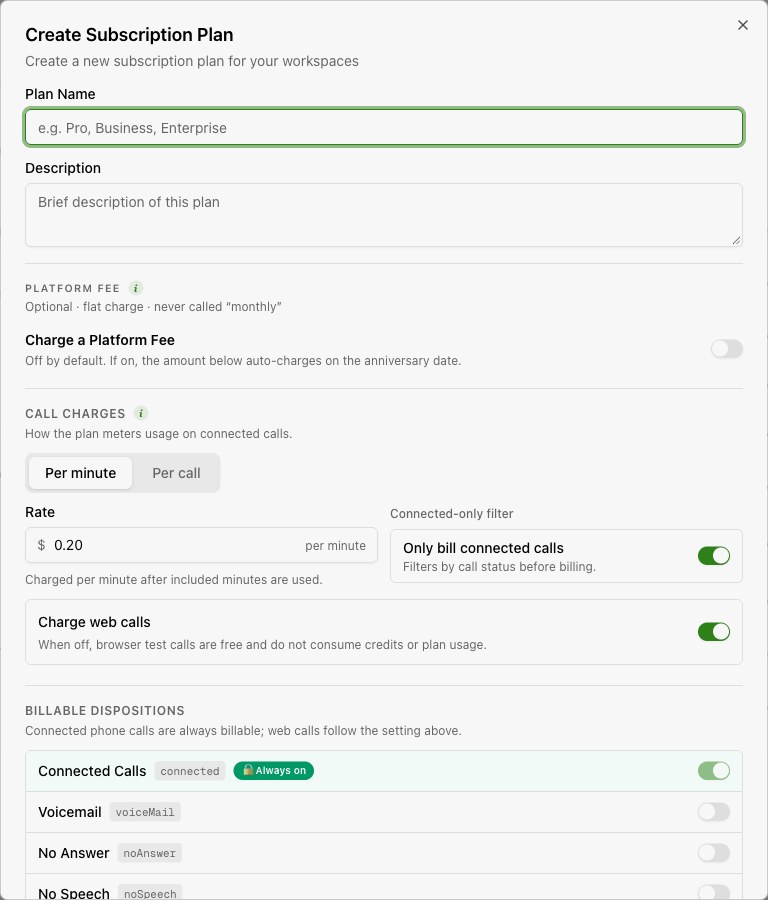
| Setting | What to decide |
|---|---|
| Platform fee | Whether the plan includes a recurring flat charge and its billing cycle. |
| Charging model | Per-minute or per-call charging, chargeable dispositions, and web-call charging. |
| Billing scenario | The prepaid or postpaid arrangement, including threshold or bolt-on options shown in the editor. |
| Workspace limits | The limits offered to this client plan. |
| Entitlements and add-ons | The included features and extras. |
| Active status and displayed features | Whether the plan is offered and how it is described. |
Organization per-minute rate
Billing > Pricing Configuration exposes an organization per-minute rate in USD. Client plan rates and scenarios also affect billing, so this rate alone does not describe every client's charges.
If a client remains in provisioning, check whether its plan needs completed payment or manual activation. See Workspaces.